Changelog
Release notes for each version of Hover Translate.
- Added referral rewards. When a friend signs up using your invitation code and buys their first Pro membership, you receive 30 days of Pro membership. Rewards from different friends add up.
- Fixed an issue where the source sentence and its translation could be missing from lookup results.
- Improved the client’s interface and interactions.
- Added a “Disable in specific apps” setting. Hover Translate’s translation shortcuts are disabled in the selected apps to prevent shortcut conflicts.
- Fixed an issue where area translation could incorrectly report that no text was recognized.
- Improved the client’s interface and interactions.
- Improved automatic network route selection to reduce latency.
- Improved the client’s interface and interactions.
- Fixed an occasional blank popup when clicking a sign-in field.
- Improved hover lookup accuracy.
- Added a network connection setting. Follow System (the default) uses your system’s network and proxy settings. Direct lets translation and other in-app service requests connect without using the system proxy, so you can leave your proxy enabled.
- Improved text selection and copying in recent lookups, vocabulary, and review pages.
- Improved automatic route selection after switching networks.
- Improved the appearance of verification emails.
- Added a Windows version, supporting Windows 10 and later.
- Improved the area and selection translation cards, which can now be resized by dragging the bottom-right corner.
- Improved network connections by automatically choosing the faster route, reducing latency worldwide.
- Improved hover translation accuracy on two-column layouts.
- Improved the layout of Settings.
- Fixed an issue in the client.
- Added a guided tour. After you sign up, it walks you through hover, area, selection, and input translation, and you can skip any step.
- Improved permission setup: drag Hover Translate into the list in System Settings to turn each permission on.
- Added Open at Login, which can be turned on in Settings.
- Added Show in Dock, which can be turned on in Settings.
- Improved the input translation experience.
- Improved the visual details of the client.
- Fixed an issue in selection and area translation.
- Added input translation. Press Option + I or open it from the menu bar, then type or paste text to translate it.
- Added a review reminder, which can be turned on in Settings. When it is on, the number of words that need review appears next to the menu bar icon.
- Improved recognition accuracy for vertical text.
- Improved area translation with alternate-language support: text already in the target language is translated into the alternate language.
- Improved abbreviations, which now show the full form in their original language before the meaning.
- Added vocabulary export, saving every entry that matches the current filters as a complete vocabulary file (CSV), an Anki deck, or a Bubei word list.
- Improved lookups of hyphenated English words: selecting one component returns the meaning of the complete word, followed by the everyday meaning of that component.
- Refined the system prompt, improving whether a lookup returns a complete phrase or a single word within it.
- Improved detection of sentences already in the target language, now judged from the complete sentence, so the switch to the secondary target language happens when it should.
- Improved the visual details of the client.
- Added British English pronunciation, so English audio can be switched between American and British in Settings.
- Added automatic pronunciation playback, which can be turned on in Settings.
- Improved recognition accuracy for tilted text.
- Improved the visual details of the client.
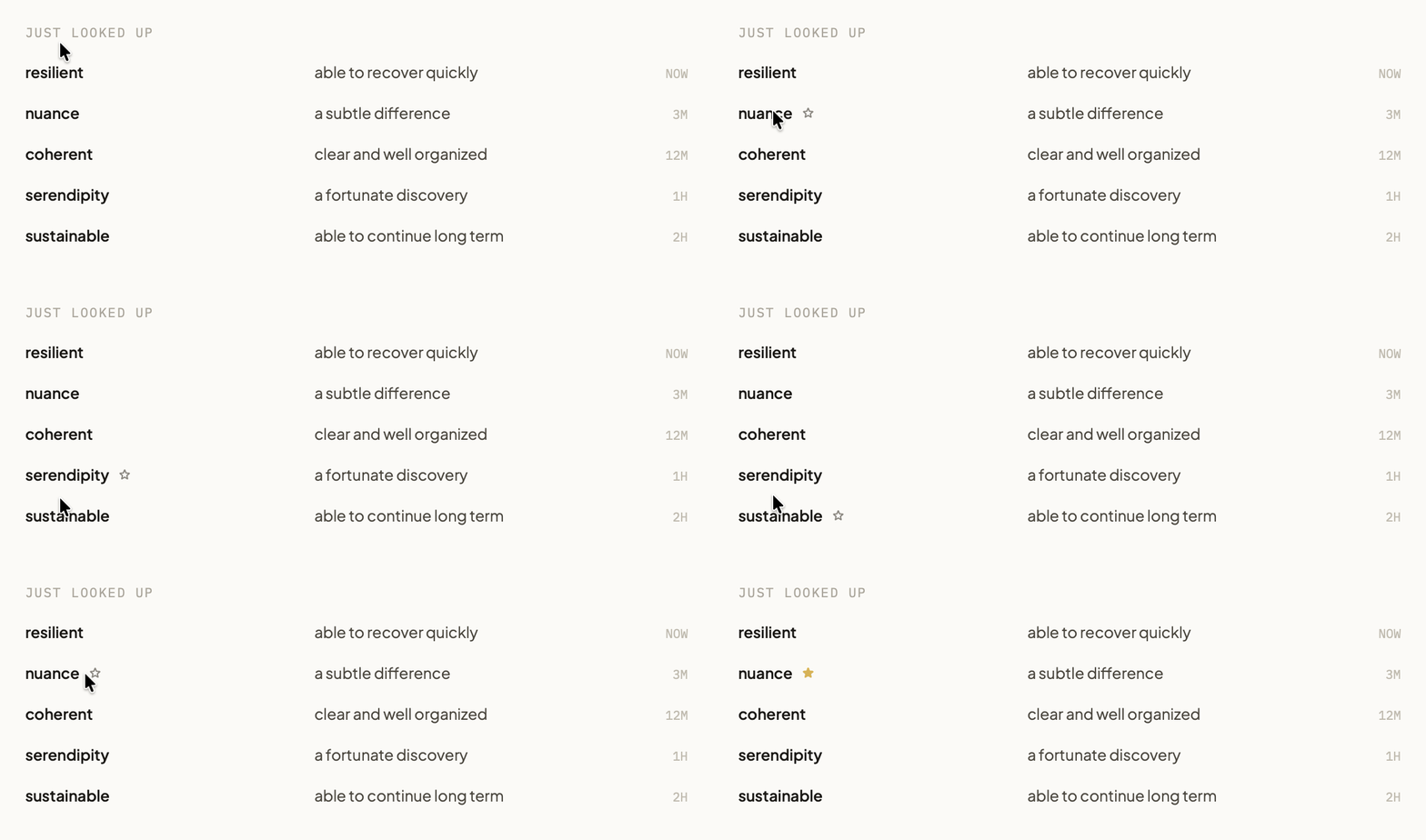
- The main window keeps your recent results; hovering a row reveals the add control, and selecting the star adds that word to the vocabulary list without repeating the lookup.
- Added email verification at registration, and password reset by email.
- Improved the sign-in and registration interfaces.
- Improved the experience during connection failures: saved sign-in information is retained, connection status is shown, and the app reconnects automatically when the network returns.
- Rebuilt the first-run permission setup, revising page structure and wording; first-time setup and re-authorization no longer use different headings.
- Changed how completion is determined, using translation actually working rather than reaching the end of the flow.
- Improved the menu bar icon, which now uses the same rounded tile as the app icon.
- Improved same-language sentence handling: when a sentence matches the current target language, it is translated into the secondary target language instead of being returned unchanged. This applies to both hover lookups and select translation.
- Improved how mixed-language content is handled, so passages containing more than one language return more consistent results.
- Added select translation. Selecting text and pressing the shortcut displays the translation in place, without copying or switching windows. The shortcut can be customised or shared with hover lookup; when shared, selected text is translated first, and a hover lookup runs when no selected text can be read. It applies wherever text can be selected, including webpages, chats, and documents.
- Added language filtering to the vocabulary list, so saved entries can be viewed by language.
- Renamed the secondary target language setting to match what it actually does, and removed the former reading-language setting.
- Improved browsing of long vocabulary lists by loading more entries as you scroll while keeping each entry's saved contexts together.
- Improved how meanings are defined, now per source-and-target language pair, covering same-language combinations that were previously undefined.
- Refined the system prompt, improving lookup and translation accuracy across languages.
- Updated the app icon and applied it consistently across the app.
- Fixed the fallback used when a selection cannot be read, and stopped window switches from interrupting a request already in flight.
- Fixed area translation omitting parts of passages containing multiple languages.
- Fixed an overlay that could occasionally remain after an area selection.
- Added support for keeping two clients signed in to one account at the same time.
- Improved the interface across the client, unifying the information hierarchy on the home and settings pages.
- Refined the system prompt to improve lookup quality: particles in phrasal verbs get their own gloss, and Title Case words are expanded only when they are genuinely proper names, so ordinary words are no longer treated as abbreviations.
- Improved the rule for deciding sentence boundaries, so repeating a lookup on the same passage returns a more stable sentence.
- Improved the response time of sentence translation.
- Fixed state left behind by an interrupted area selection.
- Improved where the area translation panel appears, preferring below and to the right of the selection and falling back to the side when there is not enough room.
- Fixed area translation results losing their hierarchy.
- Fixed the area panel's height, which is now sized from the selection and no longer leaves excess blank space.
- Fixed the panel becoming undraggable after scrolling, and kept the drag area in the header continuous.
- Added panel pinning. A pinned card is not replaced by the next lookup and survives switching Spaces.
- Added first-run permission setup.
- Improved the permission flow, skipping setup when access has already been granted.
- Improved the status bar menu styling to match system menus.
- Added interface languages, in Simplified Chinese and English.
- Added a Control + Option chord for the lookup shortcut.
- Improved feedback when adding to the vocabulary list, which now shows success immediately.
- Improved wording consistency across both interface languages, and refined the review interface.
- Improved data transfer efficiency for hover and area translation.
- Improved the review interaction, swapping the buttons instantly when an answer is revealed.
- Added text copying from the translation panel.
- Rebuilt the macOS client interface, unifying content width and hierarchy across pages.
- Rebuilt the area translation panel, which now shows the detected source language.
- Improved Home Recent, where truncated rows can be expanded in place.
- Improved translation panel layout, with the pronunciation button beside the headword.
- Fixed panel content overflowing when the result is short.
- Fixed pronunciation not playing automatically when a review answer is revealed.
- Improved lookup and area panel layout, which now adapts so spacing holds up across different content lengths.
- Improved the wording of the vocabulary add control.
- Fixed the area translation panel flashing before the result arrives.
- Fixed a leftover fade on the selection scrim.
- Added area translation. Holding the shortcut and dragging a selection translates the enclosed text as a single passage. It applies to image captions, video subtitles, and PDF paragraphs.
- Added a vocabulary list. A lookup can be added to it from the translation panel, together with the sentence the word appeared in; entries can be filtered by learning status and when they were added, and removed from future review when no longer needed.
- Added review. Each item is scheduled by its retention state, and items without a saved context can be reviewed as a word alone.
- Added light and dark themes.
- Added menu entries that jump straight to each section.
- Rebuilt the translation panel's material, border, and shadow, and reduced its width.
- Improved sentence boundaries and handling of wrapped lines, reducing truncated sentences and unrelated text in sentence translations.
- Improved pronunciation, where repeated taps alternate between normal and slow, with slow set to 75%.
- Improved vocabulary list and context row layouts.
- Fixed secondary clicks on the panel passing through to the app underneath.
- Improved lookups in code and identifiers, preserving readable tokens so camelCase identifiers are no longer split apart.
- Fixed app icon corner rounding on macOS 14 and 15.
- Rewrote the macOS client as a native application, with a significantly smaller download.
- Added macOS 14 support.
- Improved meanings, tightening them to the single sense that fits the context and dropping redundant category prefixes and repetition.
- Improved pronunciation with more natural voices.
- Improved how sentence results appear, streaming in progressively instead of waiting for the whole passage.
- Fixed the translation panel shifting position as results updated.
